Pencil Pattern: The Colorful SVG Font for Modern Design
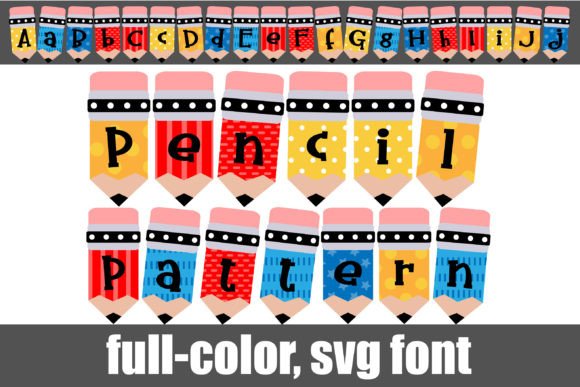
Imagine a font that doesn't just spell out words but dresses them in the playful, tactile charm of a classroom staple. The Pencil Pattern font does exactly that, transforming each letter into a vibrant, patterned pencil, offering a unique solution for designers seeking instant personality and visual texture in their work.
Understanding This Creative Typography Asset
Pencil Pattern is a full-color OpenType (SVG) font. Unlike standard fonts limited to single colors, it embeds vector graphics and color data directly into the font file. Each character appears as a colorful pencil with a serif design, and an alternate version in a different color is accessible via your system's character map. This technology allows for intricate, multi-colored typography that remains crisp and scalable.
Installation is straightforward: on Mac, use FontBook; on Windows, use your preferred font manager or the Control Panel. It installs like any standard .OTF file. A key consideration is compatibility. Color fonts typically display as solid black in non-supporting software. You will know your program supports them when you type and see the colors rendered. Adobe Creative Suite, Silhouette Studio, QuarkXPress, and Inkscape are among the applications that fully support full-color SVG fonts, making them a versatile tool for modern graphic design workflows.
Practical Applications for Visual Impact
The true value of a resource like Pencil Pattern lies in its application. Its inherent texture and color make it ideal for projects where a sense of creativity, education, or handcrafted quality is desired.
Branding and Marketing Materials
For brands targeting education, children's products, stationery, or creative services, this font can become a cornerstone of brand identity. Use it in logos, packaging design, and print advertisements to instantly convey a specific aesthetic. The built-in color palette ensures consistency across digital marketing assets and social media graphics, strengthening visual recognition.
Digital and Editorial Design
In web design and UI design, Pencil Pattern can create striking headings or call-to-action buttons that enhance user engagement without compromising functionality when used judiciously. For editorial design, it brings energy to magazine covers, book titles, or blog post headers. Its vector-based nature means it scales perfectly for large-format prints like posters or merchandise, maintaining quality at any size.
Tips for Effective Implementation
To leverage such a distinctive asset effectively, thoughtful integration into your broader design system is crucial.
- Prioritize Hierarchy and Readability: Use Pencil Pattern for headlines, pull quotes, or short accents, not body text. Pair it with a clean, neutral sans-serif or serif font for paragraphs to maintain a strong visual hierarchy and ensure readability.
- Harmonize with Your Color Palette: While the font has its own colors, ensure they complement your existing brand palette. The alternate character colors provide flexibility to find the best match.
- Audience and Context Alignment: Evaluate if the playful, illustrative style aligns with your audience's expectations and the project's goals. It's perfect for a back-to-school campaign but may not suit a corporate law firm's website.
- Test Across Platforms: Always preview your designs in the final delivery environment—whether it's a website, a PDF, or printed material—to ensure the color font renders as intended.
In the realm of modern aesthetics, where authenticity and visual storytelling are paramount, assets like Pencil Pattern offer a shortcut to compelling visual communication. They empower designers, marketers, and creators to inject immediate character into their projects, from logo design to social media content. By selecting high-quality, specialized creative assets and applying them with strategic intent, you elevate not only the beauty of your work but also its ability to connect, communicate, and leave a lasting impression. Thoughtful design choices, supported by the right tools, are what transform good ideas into professional, impactful presentations.